Visa Need Signals: Triggers Airlines Flag at Check-In

Airlines do not ask visa questions at check-in just to slow lines. They do it because carrier liability, on-time performance, and customer satisfaction depend on catching visa need signals before a passenger reaches the gate. In 2025, with new digital authorizations rolling out and routes combining multiple border regimes, the ability to detect and resolve visa requirements early is now a core operational capability.
This guide explains the most common triggers airlines flag at check-in, why those triggers fire, and how to move detection earlier in the journey with automated, customer-friendly workflows.
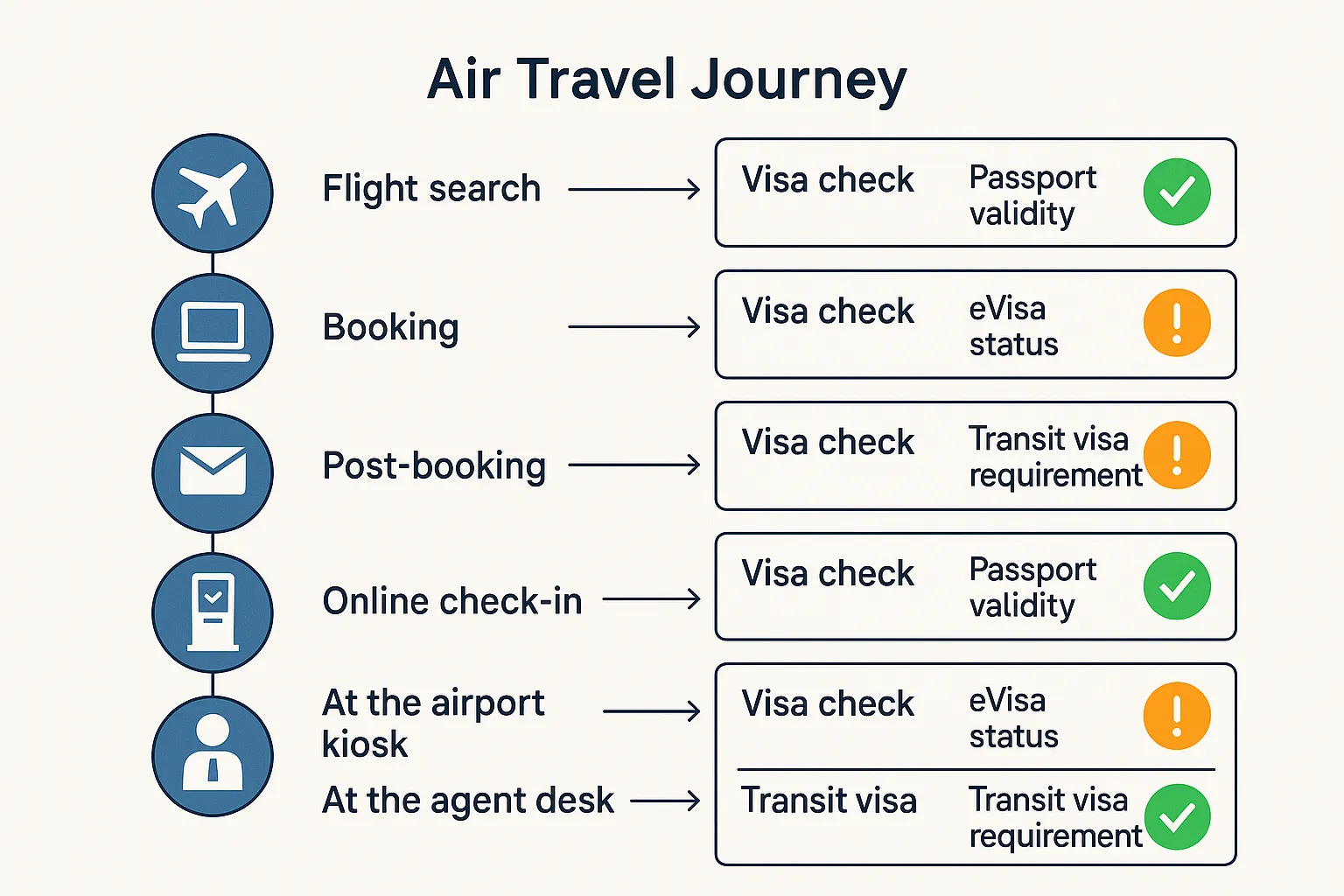
Where visa need signals originate in an airline operation
Visa checks are not a single database lookup. They come from several systems that converge at check-in:
- Document rules engines, typically powered by IATA’s Timatic, queried with origin, destination, transit points, nationality, residence, travel dates, and purpose of travel. See the industry standard, IATA Timatic.
- Passport scans and MRZ OCR at kiosks or counters. These populate SSR DOCS and validate against names and dates in the PNR.
- Advance Passenger Information submissions. For some markets, Interactive APIS returns board or no-board style responses when carriers submit traveler biographic data. See U.S. CBP APIS overview.
- External travel authorizations. ESTA, eTA, ETIAS, and similar systems must be granted and sometimes matched to the traveler’s passport before boarding. Official references: ETIAS, UK ETA guidance.
- Manual evidence at the counter. Printed or digital eVisas, invitation letters, return tickets, or health certificates when required by the route rules.
Airlines face fines and return-to-origin costs if they transport inadmissible passengers. That is why check-in systems escalate any uncertainty, and why moving detection earlier prevents denied boardings and protects margins.
The most common visa need triggers airlines flag at check-in
Below is a practical taxonomy of triggers that frequently block online check-in or stop a boarding pass at the kiosk. Grouping them helps product, airport, and support teams design targeted fixes.
Passport and identity triggers
- Passport validity shortfall. Many destinations require 3 or 6 months validity beyond entry or exit. If the passport expires too soon, systems flag a visa or entry risk.
- Insufficient blank pages or damaged passport. Physical condition exceptions still matter in some markets, even with eVisas.
- Data mismatches. Name order, diacritics, hyphens, or date format differences between MRZ, booking, and authorization records trigger manual checks.
Nationality, residence, and purpose triggers
- Visa required for nationality. The traveler’s passport requires a visa that is not on file. This is the classic visa need signal.
- Wrong authorization type for purpose. Business travel on a tourist eVisa can be flagged by agents when purpose is captured.
- Dual citizenship mismatches. The authorization was issued to a different passport than the one presented at check-in.
Itinerary and transit triggers
- Transit visa required. Some hubs require airside or landside transit visas for specific nationalities or when changing terminals.
- Leaving airside during long layovers. Exiting the sterile area converts a transit into an entry, which may require a visa.
- One-way or no onward ticket. Routes that expect proof of onward travel can block or escalate to an agent.
Digital authorization and eVisa triggers
- Missing or expired ESTA, eTA, ETIAS, or destination eVisa. Online check-in frequently checks for these before issuing a boarding pass.
- Name or passport-number mismatch on an eVisa. Many authorizations are bound to the issued passport number.
- Valid authorization on an old passport. Renewed passport without transferring or reissuing the linked digital authorization.
Health and special-category triggers
- Required vaccination certificate. Yellow fever and, in some corridors, polio documentation may still be needed based on travel history.
- Unaccompanied or minor travelers. Some countries require consent letters or additional documents for minors.
What agents see, why it fires, and quick fixes
| Trigger | What the DCS or agent sees | Why it fires | Fast fix travelers accept |
|---|---|---|---|
| Passport validity under route rule | Block at online check-in or kiosk, escalate to desk | Destination requires validity beyond stay | Renew passport or change destination dates. If renewal is impossible, rebook itinerary |
| Visa required for nationality | Red or amber banner in DCS after Timatic query | Nationality-destination pairing needs a visa | Apply for eVisa if available, or rebook. Provide guided application link |
| Missing ESTA, eTA, ETIAS | OLCI blocked, APIS/IAPI response requires check | Pre-travel authorization mandatory | Complete authorization online before airport arrival |
| Transit visa required | DCS alert at connection point | Hub rules for specific nationalities or terminals | Route via a visa-free hub, or apply for the transit visa |
| Name or passport mismatch on eVisa | Manual review at desk | eVisa bound to different passport or spelling | Re-issue authorization with the current passport details |
| One-way ticket to visa-restricted market | Agent prompt to verify onward travel | Immigration expects proof of onward travel and funds | Buy an onward ticket or show acceptable proof of exit |
| Unaccompanied minor documentation | Desk escalation | Country requires consent letter and custody proof | Present notarized consent forms and copies of guardians’ IDs |
| Yellow fever or other certificate | Health-doc prompt based on last 6 days travel history | Country health rules for arrivals from affected regions | Present certificate or reroute to avoid restriction |
| Insufficient blank pages | Manual inspection fail | Some visas still require a physical stamp/sticker | Renew passport or adjust route to eVisa-only destinations |
| Damaged passport | Visual inspection fails | ICAO document integrity rules | Replace passport before travel |
This is not exhaustive, but it covers the majority of real-world blocks.
The cost of catching signals late
- Operational disruption. Counter resolutions add minutes per passenger, undermining OTP and queue SLAs.
- Financial exposure. Carriers can face fines and repatriation costs when an inadmissible traveler is transported under carrier liability schemes in multiple jurisdictions.
- CX damage. A last-minute denial creates churn and negative NPS, often posted publicly.
Shifting detection left, into booking and post-booking, avoids the counter crisis while creating space for a guided fix.
Move visa need detection earlier in the journey
A practical, phased approach works for most airlines and OTAs.
- At search and booking
- Display route-level entry guidance with clear disclaimers, keyed to nationality and travel dates. Keep copy concise, with a one-click path to requirements.
- Capture intent and purpose where permitted, to improve rule accuracy.
- Immediately post-booking
- Send a personalized checklist that highlights any visa need signals. Include a link to start a guided eVisa application and a recommended deadline.
- Schedule automated reminders at T minus 10 days, 72 hours, and 24 hours when an authorization is still pending.
- Online check-in gate
- Validate passport and authorization status before issuing the boarding pass. Offer a failover path to finish an eVisa application if the route supports fast approvals.
- Day-of-travel safety net
- Surface a concise, plain-English summary at the counter: what is missing, how to fix, can the fix be done now, or must the itinerary change.
For examples of how brands orchestrate these moments, see SimpleVisa’s guides: Building a Seamless Post-Booking Visa Journey and Ultimate Guide to Marketing eVisa Services During the Booking Flow.
Designing the agent and kiosk experience
- Keep it binary. Present accept, refer, or deny with a single reason and next best action. Walls of legal text reduce throughput.
- Offer evidence capture. Allow agents to scan or upload an eVisa PDF or confirmation number that can be re-checked in real time.
- Standardize escalation. Build a route for Duty Officer or immigration liaison calls, with a shared fact pack that includes rule citations pulled from your rule engine.
Data you need to compute visa need signals
- Traveler: nationality, passport expiry date, place of birth if required by route, residence when it affects eligibility.
- Itinerary: origin, destination, transit points, terminal changes, time in transit, travel dates.
- Intent: purpose of travel, employer or host details if needed for business routes.
- History markers where allowed: prior ETAs or visas linked to the passport, and recent travel history necessary for health rules.
Minimize collection, ask only for what the rule requires, and log consent. Airlines remain responsible for compliance even when using a third-party rules service.
KPIs to measure after implementation
- Visa-related OLCI success rate. Percentage of bookings where boarding passes are issued without manual visa intervention.
- Denied boarding rate due to documents. Aim for a steady decline after adding pre-travel nudges and guided applications.
- Ancillary revenue per booking from visa services. Track attach rate and net contribution by route and origin market. See Ancillary Revenue Explained.
- Average time-to-resolution for escalations. Measure counter and contact-center minutes saved.
- CSAT for visa assistance journeys. Short, single-question surveys on post-resolution flows work well.
For industry benchmarks and dashboards, see 5 KPIs to Track After Deploying a Visa Management Platform.
Implementation options with SimpleVisa
- API integration for travel sites. Surface real-time visa requirements, eligibility checks, and application starts directly in your booking and manage paths to completion.
- No-code and white-label options. Launch a branded visa portal or embed a widget in under an hour to validate demand before deeper integration. See the quick widget tutorial.
- Guided customer applications. Travelers complete compliant eVisa submissions with fewer errors, which supports the high approval rates partners report.
- Custom data services. Receive structured visa need signals and status updates that your DCS, CRM, or messaging systems can act on.
The aim is twofold: fewer last-minute counter surprises, and a measurable lift in ancillary revenue per booking. For practical examples of operational impact, review How Airlines Can Use eVisa Data to Reduce No-Show Rates.
Frequently Asked Questions
Do airlines rely only on Timatic to decide boarding? Timatic is the industry standard for rules, but airlines combine it with passport scans, APIS responses, and evidence of valid authorizations. The final decision to board rests with the carrier.
Can airlines verify authorizations like ESTA or ETIAS automatically? On some routes, Interactive APIS or government responses indicate whether pre-travel authorizations are on file. Where direct verification is not available, carriers rely on traveler-provided evidence and rules engines.
Does an approved ETIAS or eVisa guarantee entry? No. Approval permits travel, while border officers make the final decision upon arrival. Always ensure your purpose of travel, funds, and documentation match what the authorization allows.
What data is minimally required to show accurate visa need signals? Nationality, passport expiry, itinerary including transit points and dates, and purpose of travel. Some routes also require residence or recent travel history for health rules.
Should travelers still carry printed copies of eVisas? Many destinations do not require a printout, but carrying a digital and printed copy can speed manual checks and resolve name or ID number mismatches at the counter.
Bring visa need detection into your booking flow and turn compliance friction into customer loyalty and new revenue. SimpleVisa offers API, no-code widgets, and white-label apps that guide your customers through requirements and applications, available on more than 400 partner sites. To see how this works in your stack, book a short demo at SimpleVisa.