Processing of Visa: What Happens After You Submit

The hardest part of a visa application is often not the form, it is the waiting. After you hit Submit, the “processing of visa” phase starts, and for most travelers it can feel like a black box: no updates, unclear timelines, and confusing status labels.
In reality, most visa and eVisa systems follow a fairly consistent set of steps. Understanding them helps you set expectations, spot issues early, and avoid mistakes that slow decisions down.
First: what “submitted” actually means
A visa application is generally considered submitted only when the issuing authority (or its authorized platform) has received:
- The completed form (all required fields)
- All required uploads (passport scan, photo, supporting documents)
- Payment confirmation (where applicable)
- A valid application reference number
If you do not receive a confirmation email or a reference number, you may not be in processing yet. In that case, the issue is often technical (payment not captured, file upload failed, session timed out) rather than governmental.
The behind-the-scenes stages of visa processing
Different countries use different terminology, but most systems move through the same core workflow: intake, screening, review, and decision.
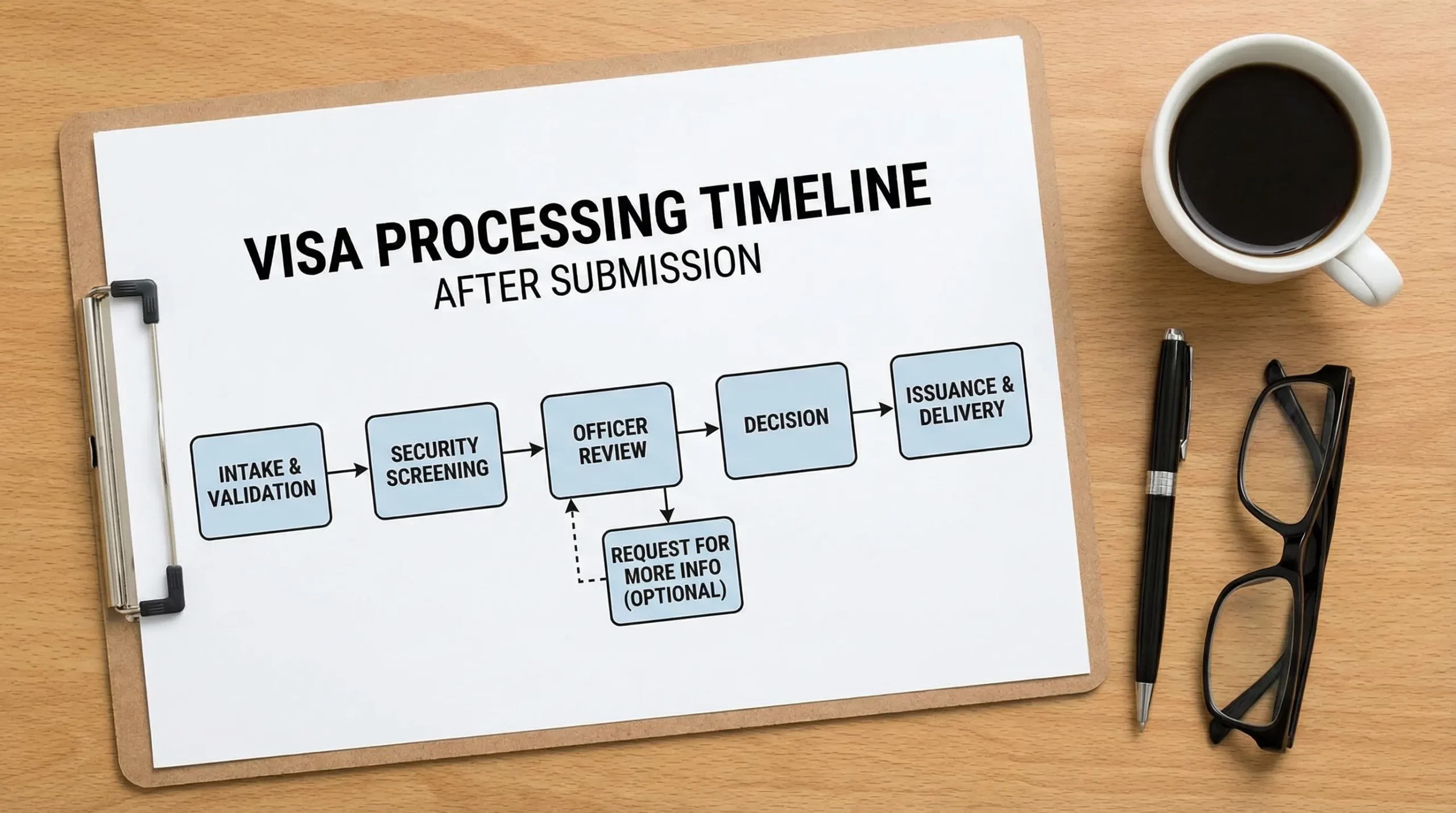
Stage 1: Intake and validation (automated checks)
This is the first pass, and it is increasingly automated.
Typical checks include:
- Data validation (required fields completed, dates logical, passport not expired)
- Document readability (passport MRZ visible, files open correctly)
- Photo compliance (background, size, glare, face position)
- Basic duplication checks (has this passport number already applied recently?)
What you might see: “Received,” “In progress,” “Submitted,” or no visible change at all.
Why it matters: many delays happen here, because a bad scan or a missing page triggers a manual exception queue.
Stage 2: Identity and security screening
Most governments run some level of background and security screening. The depth depends on the destination, the visa type, and the applicant’s profile.
This can include:
- Cross-checks against internal immigration records
- Watchlist and border-security database queries
- Travel history consistency checks
- Fraud pattern detection (for example, reused documents across applicants)
What you might see: “Under review,” “Processing,” “Pending,” or in some consular systems, a status like Administrative Processing.
For U.S. consular visas, the State Department explains that “administrative processing” can occur after an interview and may require additional time before a final decision is possible (see the official overview on travel.state.gov).
Stage 3: Eligibility and officer review
At this point, a decision-maker (or a rules engine with human oversight) evaluates whether you meet the visa program’s requirements.
This usually includes:
- Matching your stated purpose of travel to the correct visa category
- Reviewing supporting evidence (funds, itinerary, invitation letter, accommodation)
- Checking consistency across documents (names, passport number, dates)
What you might see: “In review,” “Assessment,” “Being processed.”
Stage 4 (optional): Request for more information
Some applications pause because the authority needs clarification, a better-quality document, or an additional supporting file.
Common examples:
- A clearer passport bio-page scan
- Proof of onward/return travel
- An updated hotel booking or address
- Additional employment or financial evidence
What you might see: “Action required,” “Document request,” “Additional information needed.”
Your best move is to respond quickly and precisely. Upload exactly what is requested, and avoid adding extra, unrelated documents unless the instructions allow it.
Stage 5: Decision (approved, refused, or pending)
Most systems end in one of these outcomes:
- Approved: you receive an approval notice, often with a PDF or an electronic record.
- Refused/Denied: you receive a refusal notice, sometimes with a reason code or a general explanation.
- Pending: the application remains open while checks continue (often labeled as processing).
Important nuance: even with an approved visa or eVisa, entry is typically determined at the border by the inspecting officer.
Stage 6: Issuance and delivery
“Approved” does not always mean “in your hands.” Issuance varies by visa type:
- eVisa: usually sent by email or made available for download.
- Sticker/label visa: passport may be held for printing and then returned by courier or pickup.
- Visa that requires biometrics/interview: approval might come only after in-person steps.
What you will see as an applicant (status labels decoded)
Status words are inconsistent across portals. Here is a practical translation of common labels.
| Status you see | What it usually means | What you should do |
|---|---|---|
| Submitted / Received | The system has your application | Save the reference number, check email/spam folders |
| Pending / In progress | Waiting in a queue or undergoing automated checks | Avoid duplicate applications unless instructed |
| Under review | Screening and eligibility review is underway | Monitor for document requests |
| Administrative processing | Additional checks are required (term common in some consular systems) | Be ready to provide extra info if contacted |
| Action required / Additional documents | Processing is paused until you respond | Upload exactly what is requested ASAP |
| Approved / Granted / Issued | A decision was made in your favor | Download, verify details, store backups |
| Refused / Denied | A decision was made not to grant the visa | Read the reason carefully, check reapply/appeal rules |
If you are using a U.S. consular process, the official status check is typically done via the Consular Electronic Application Center (CEAC) website: CEAC Visa Status Check.
How long does visa processing take after you submit?
There is no universal timeline. Processing time depends on the destination, the travel document type (eVisa vs consular visa), seasonality, and whether your case is selected for extra checks.
A helpful way to think about it is by “processing layers”:
| Visa pathway | Typical processing pattern | Common reasons it speeds up or slows down |
|---|---|---|
| eVisa (fully digital) | Often faster because intake and validation are automated | Slowdowns from poor scans, name mismatches, peak travel periods |
| Consular visa (passport submission) | Often longer due to appointments, interviews, printing, and logistics | Appointment availability, administrative processing, courier delays |
| Travel authorizations (eTA/ESTA-like) | Often rapid decisions, with occasional manual referrals | Watchlist hits, data mismatches, incomplete history |
Practical advice: if you have not yet traveled, avoid booking non-refundable arrangements until your visa status is clear.
The most common reasons applications “stall” after submission
When applicants say “nothing is happening,” it is usually one of these:
Data mismatches
A single character difference (middle name missing, swapped surname order, wrong passport issue date) can trigger a manual review.
Low-quality uploads
Blurry scans and cropped passport pages cause exceptions. Many systems cannot reliably read your MRZ, and an officer has to intervene.
Country-specific verification
Some destinations verify invitations, host information, or prior travel records. That can add time.
Peak season backlogs
Summer travel, end-of-year holidays, and major events can spike volumes.
Duplicate submissions
Submitting twice can create confusion: two records, two payments, or conflicting data.
What you should do while your visa is processing
Most applicants cannot “speed up” government processing, but you can prevent avoidable delays.
- Watch your email and spam folder for document requests.
- Keep your passport accessible in case you need to re-scan or submit it.
- Do not change critical travel details (passport renewal, name changes) without checking whether you must update the application.
- Prepare a clean evidence bundle in case you are asked for more documents.
And if you are waiting in long lines for biometrics or interviews, plan like it is a travel day: water, a power bank, and a high-protein snack. Some travelers even pack shelf-stable options like bulk beef jerky online to avoid relying on overpriced airport or consulate-area food.
What to do if you think something is wrong
A reasonable escalation path looks like this:
Confirm you are using the right tracking channel
Use the official portal or the official status tool for that visa type. Third-party “trackers” that are not tied to the issuing authority often show outdated or generic information.
Re-check your confirmation
Make sure the payment cleared and you have a reference number that matches the portal.
Look for “action required” steps
Many applicants miss these because they only check the portal and not email notifications.
Contact the right organization
If you applied through an authorized provider or travel partner, contact their support first, they can often validate whether the submission is complete and readable.
If you applied directly with a government portal, use the contact method listed on that portal. For consular cases, the embassy or consulate is often the only channel that can comment on case-specific issues.
For travel brands: how to explain post-submission processing to customers
If you are an airline, OTA, cruise line, or agency, the post-submit stage is where support tickets spike. The winning approach is to reduce uncertainty.
Set expectations with:
- Plain-language status definitions (what “under review” actually means)
- A simple “what happens next” timeline
- Proactive reminders to check email/spam folders
- A clear escalation policy (when you can help vs when only an embassy can)
This is also where automation helps. If your travelers can apply in-flow with guided steps, document checks, and clear status updates, they are less likely to abandon the trip or overwhelm your contact center.
Frequently Asked Questions
Can I travel while my visa is being processed? Usually no. You typically need the visa approval (or an eligible visa-free status) before you can board, and airlines may deny boarding without it.
Does “approved” mean I am guaranteed entry? Not always. Approval means you have authorization to seek entry, but final admission is generally decided by border officials.
Why did my friend get approved in 24 hours but mine is still pending? Individual cases can be routed differently due to data validation, document quality, random checks, travel history, or security screening.
Should I submit a second application if I do not see updates? Usually not. Duplicate applications can create conflicting records and delays. Only reapply if the authority instructs you to, or if the first application is confirmed as failed/not received.
What should I do if I receive a document request? Respond quickly, upload exactly what is requested, and ensure the new files meet the format and clarity requirements.
Simplify post-submission uncertainty with SimpleVisa
If you support travelers at scale, the post-submission phase is where clarity matters most. SimpleVisa helps travel businesses streamline the visa application journey with guided customer applications, visa processing automation, and flexible delivery options (API integration, white-label app, or custom data services).
Learn more at SimpleVisa if you want to reduce visa-related friction, improve completion rates, and turn border requirements into a smoother customer experience.