How to Build a Visa FAQ Hub That Reduces Support Tickets

Visa questions are predictable, but most travel support teams treat them like surprises. A customer books, then realizes they might need an eVisa, their passport expires in 5 months, or their transit airport has its own rules. The result is the same: a flood of “Do I need a visa?” tickets, high handle times, and last-minute escalations that can end in denied boarding.
A Visa FAQ hub fixes this by turning your highest-volume visa inquiries into structured, searchable, up-to-date answers that show up in the right moment (help center, booking flow, post-booking email, and even agent tooling). Done well, it reduces support tickets, improves customer confidence, and can increase ancillary revenue by guiding eligible travelers to the right online visa processing option.
What a “Visa FAQ hub” is (and what it is not)
A Visa FAQ hub is a central knowledge destination that covers border entry requirements at the level your customers and agents actually ask about them.
It is:
- A curated set of articles that answer common visa and travel authorization questions in plain language
- Organized around traveler intent (not internal org charts)
- Designed for deflection (customers find answers without contacting support)
- Governed like a compliance-sensitive knowledge base (because rules change)
It is not:
- A single long “visa FAQ” page that becomes unmaintainable
- A destination-by-destination data dump with no guidance
- Legal advice (your hub should clearly say requirements vary and final authority is the government)
If you already publish traveler education content like “how to apply,” keep it, but separate it from the operational goal of ticket reduction. Your hub is primarily a customer-operations asset.
Step 1: Start with ticket data, not assumptions
Before writing anything, identify what actually drives contacts. Most travel brands discover that visa-related tickets cluster into a few repeatable buckets.
Good sources include:
- Support tags and macros in your helpdesk
- Chat transcripts and bot fallback questions
- Pre-departure email replies
- Internal site search terms (help center search is gold)
- Social comments and app store reviews that mention “visa,” “ETA,” “eVisa,” or “entry requirements”
Then translate raw questions into article intents. Here is a practical mapping.
| Ticket theme (what customers ask) | What the hub should publish | Deflection tip |
|---|---|---|
| “Do I need a visa for X?” | Eligibility and requirement explainer | Put “passport + destination + dates” upfront (even if you route to a checker) |
| “Is ETIAS a visa?” / “What’s an ETA?” | Terminology and differences guide | Link to your glossary if you have one (reduce confusion loops) |
| “How long does it take?” | Processing timelines article | Use ranges and clear buffers, avoid promising guaranteed times |
| “My name doesn’t match my ticket” | Name mismatch fix and prevention | Include a fast escalation path and a pre-travel cut-off |
| “Do I need to print it?” | Document presentation article | Include offline backup guidance |
| “I applied, where is it?” | Tracking and status article | Explain common status states and what triggers manual review |
If you want a benchmark for what “visa FAQs” tend to include, you can review SimpleVisa’s traveler-facing resource format in their existing guides (for example, their electronic visa FAQ content at Frequently Asked Questions About Electronic Visa). Your hub should be more operational: fewer generic definitions, more decision-ready answers.
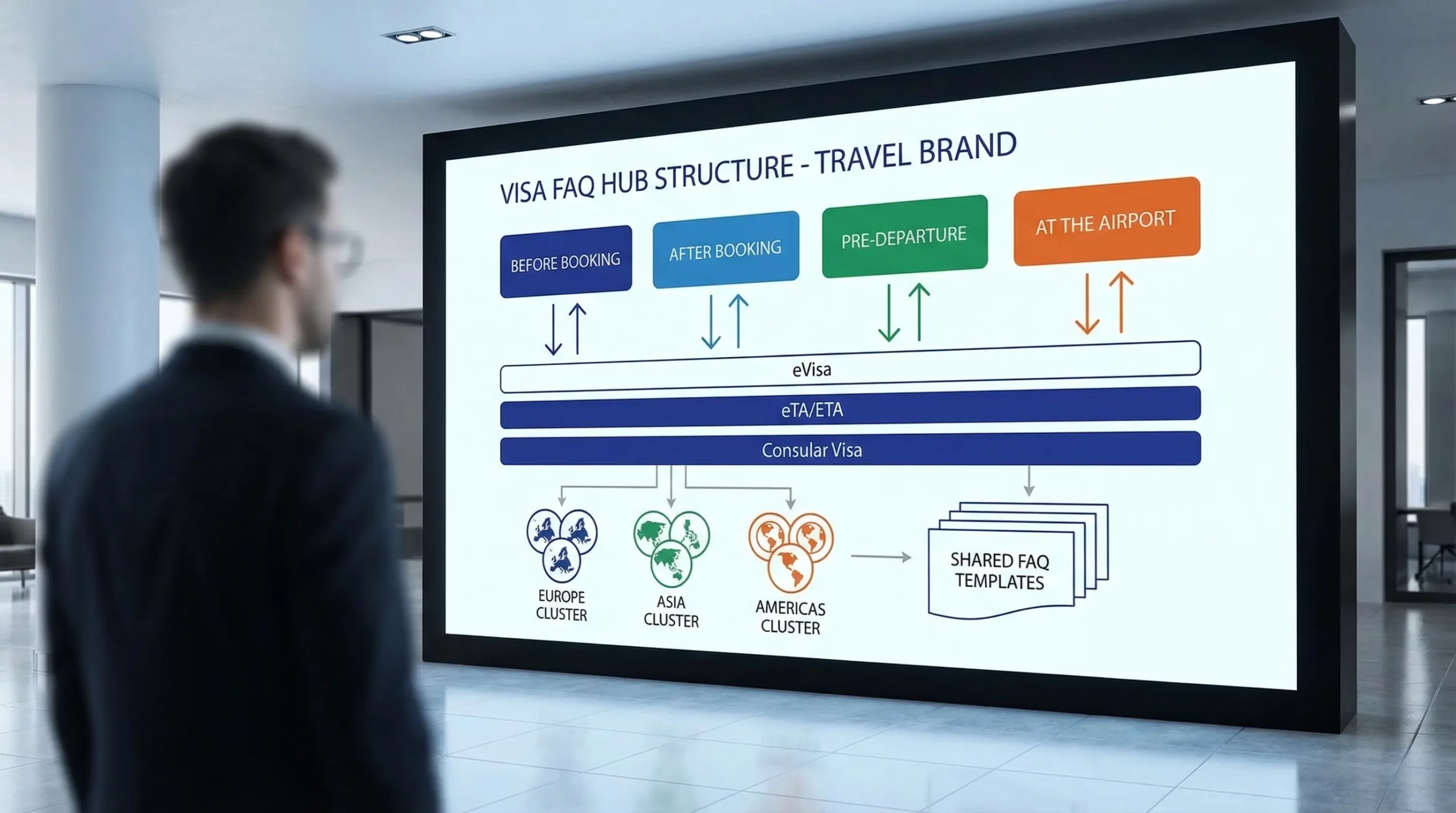
Step 2: Design the hub’s information architecture around the travel journey
Most visa questions are time-based. Customers behave differently 6 weeks before departure than they do at airport check-in.
A high-deflection structure is:
Journey stage (primary navigation)
- Before you book: “Do I need a visa?” “Can I transit?” “Passport validity rules”
- After booking: “How to apply” “What documents you’ll need” “How to fix mistakes”
- 48 hours before departure: “Approval pending” “When to contact support” “Emergency options”
- At the airport / border: “How to present an eVisa” “Carrier checks” “Offline access”
Document type (secondary navigation)
- eVisa
- eTA/ESTA-style authorizations
- Consular (traditional) visas
- Add-on documents (health declarations, arrival cards), if relevant to your audience
Destination coverage (only where it matters)
Avoid creating a thin page for every country if you cannot keep it updated. A better pattern:
- Build destination clusters for your top routes first
- Focus on the questions that generate tickets for those routes
- Use a scalable data source later if you need broad coverage
Step 3: Use a standard article template that support, legal, and product can all live with
Ticket reduction depends on consistency. If every article answers different sub-questions, customers keep contacting support.
A template that works well for visa-related content is below.
| Article block | What to include | Why it reduces tickets |
|---|---|---|
| Quick answer | 2 to 3 lines that directly answer the query | Deflects skim-readers |
| Who it applies to | Nationality/passport, destination, purpose, length of stay | Prevents “but I’m a dual citizen” follow-ups |
| What you need | Documents, photo rules, data fields, payment method | Avoids incomplete applications |
| Timing guidance | When to apply, typical processing range, buffer recommendation | Reduces panic tickets |
| Common issues | Top errors and how to fix them | Converts repeat tickets into self-serve |
| When to escalate | Clear thresholds and what info to provide | Cuts back-and-forth threads |
| Source note | Link to official government source(s) and “rules can change” disclaimer | Builds trust and reduces disputes |
Where possible, keep the “what you need” section aligned with your existing checklists so you are not duplicating content. For example, SimpleVisa already has detailed prep checklists such as Checklist: Everything You Need Before Submitting an Online Visa Application. Your hub can summarize and then link out for depth.
Step 4: Write for deflection, not education
A knowledge base article can be informative and still fail at ticket reduction if it does not match customer behavior.
Here are patterns that reliably improve deflection for visa topics:
Put the “decision” above the “explanation”
If the query is “Do I need an eVisa for Turkey?” the first screen should not be a history of eVisas. It should be:
- what to check (passport nationality, trip purpose, length)
- what the customer should do next
- what to avoid
You can still include definitions below, but do not lead with them.
Be explicit about what you can and cannot answer
Customers often ask for guarantees (“Will I be approved?” “Will I be allowed in?”). You should clearly state boundaries and direct them to the right authority.
This reduces argumentative tickets and protects your team.
Include a “pre-submission audit” box
Many repeat tickets happen because of simple mistakes (name mismatches, wrong photo format, missing middle name, expired passport). A short checklist catches this.
If you already cover these issues elsewhere, link to the deeper fix article (for instance, SimpleVisa’s guide on Handling Name Mismatches on Tickets, Passports, and eVisas: Fixes and Prevention).
Step 5: Make the hub discoverable where customers actually look
A Visa FAQ hub only reduces tickets if it is easy to find.
Help center search
- Seed synonyms: “electronic visa,” “eVisa,” “travel authorization,” “ETA,” “ESTA,” “ETIAS”
- Add “wrong but common” terms (customers will search them anyway)
- Ensure your top 20 visa articles have strong titles and matching H2s
Booking flow and post-booking surfaces
Support contacts often happen because travelers learn about entry requirements too late. Add contextual links:
- Next to passenger details (name matching, passport fields)
- In confirmation and pre-departure emails
- In manage-booking areas
If you sell visa services, this is also where ancillary revenue opportunities typically perform best, because the customer’s intent is highest.
Structured data (carefully)
If you publish question-and-answer content on a page, you can consider implementing FAQPage structured data, but only if the Q&A is visible to users and follows Google’s guidelines. The main ticket reduction win usually comes from content quality and placement, not schema alone.
Step 6: Build a maintenance workflow, because visa rules change
Visa content ages faster than most support content. Your hub needs governance.
A lightweight operating model:
Ownership
- Support/CX owns readability and ticket alignment
- Compliance or operations owns “what changed” sign-off
- Product owns in-flow placement and surfacing
Review cadence
- High-volume destinations: monthly review
- Long-tail destinations: quarterly review
- Global “definition” pages (eVisa vs visa, ETA vs eVisa): review when regulations change or product flows change
Change monitoring
Use official sources as reference points (immigration ministry sites, embassy pages) and log updates. If you also use a visa data provider, ensure your hub points to the same source of truth to avoid contradictions.
For travel brands that prefer automation, this is where travel document automation and data services can reduce manual workload (see SimpleVisa’s perspective in What Is Travel Document Automation? Definitions, Benefits, and Myths).
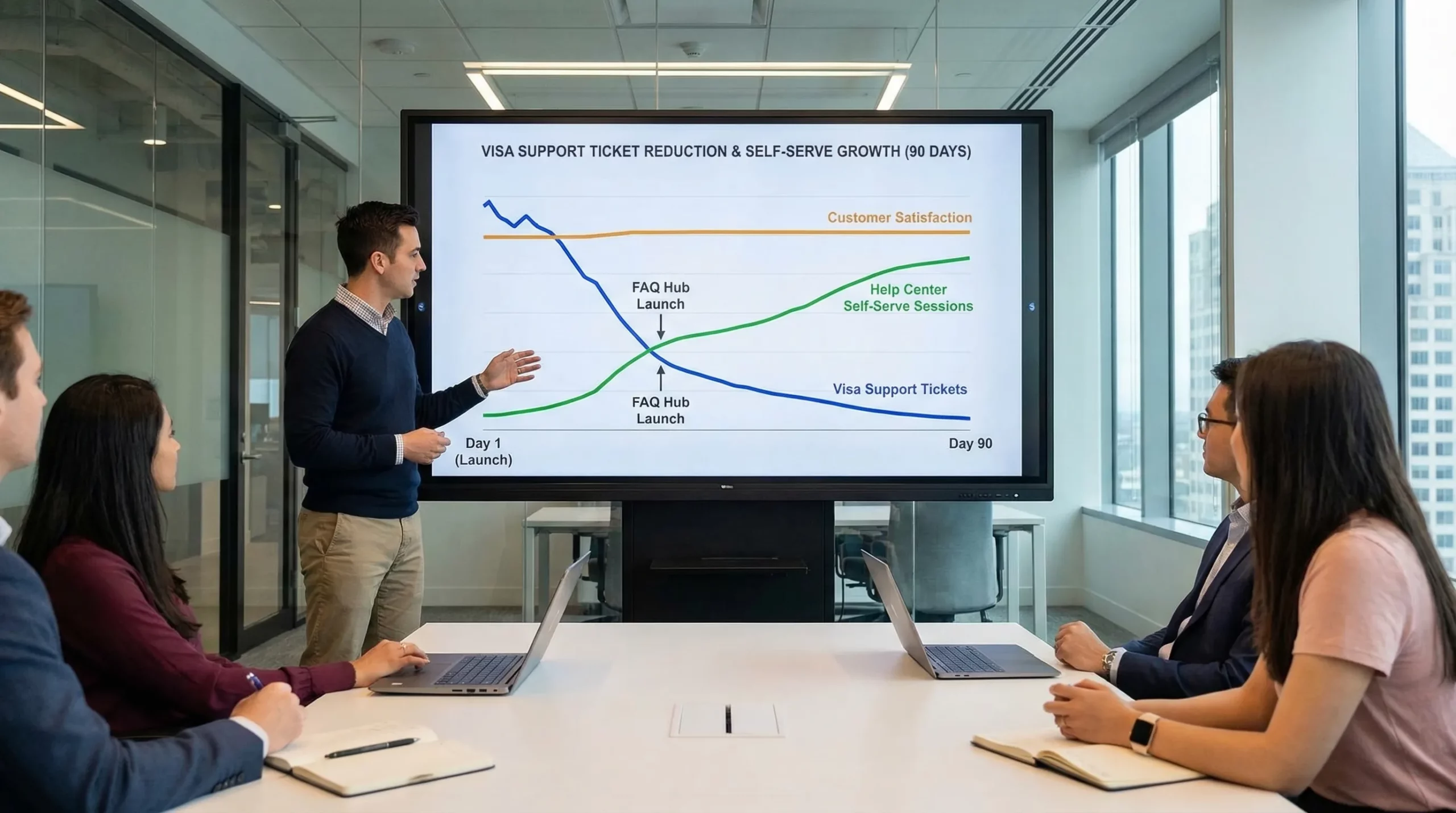
Step 7: Measure success with support and commercial metrics
Ticket reduction is measurable, but only if you set a baseline and track consistently.
| Metric | What to track | Why it matters |
|---|---|---|
| Visa ticket rate | Visa-related tickets per 1,000 bookings | Normalizes seasonality |
| Deflection rate | Help center sessions that do not lead to contact | Direct hub impact |
| Top article exits | Exits from visa articles (and next clicks) | Shows whether users got the answer |
| Repeat contact rate | Same user contacts again within 7 days | Indicates unclear or incomplete guidance |
| AHT and FCR for visa tickets | Handle time and first-contact resolution | Shows agent enablement |
| Attach rate (if you sell visas) | % of bookings that add a visa product | Indicates the hub supports revenue, not just support |
If you already track post-deployment KPIs for a visa management platform, align hub reporting to those dashboards so support and commercial teams share the same truth (SimpleVisa has a KPI framework here: 5 KPIs to Track After Deploying a Visa Management Platform).
A practical 30-60-90 day build plan
You can launch a useful hub quickly if you focus on coverage where tickets are highest.
| Timeline | Deliverables | Outcome |
|---|---|---|
| 30 days | Ticket audit, top 15 article drafts, hub navigation, search synonyms | Fast deflection for highest-volume questions |
| 60 days | Destination clusters for top routes, in-flow links, escalation thresholds | Fewer “panic” contacts, fewer escalations |
| 90 days | Governance cadence, change log, reporting dashboard, content refresh loop | Sustainable reduction and continuous improvement |
Where SimpleVisa fits if you want to go beyond content
A Visa FAQ hub reduces tickets best when it is paired with action, not just answers. If your travelers can resolve requirements inside the journey, fewer contacts happen.
SimpleVisa’s positioning is to simplify border crossing administration for travel businesses, with options that can be embedded into booking flows or offered through a white-label visa application experience, as well as via data services. If you want the hub to do more than explain requirements, these integration paths can let customers move from “What do I need?” to “Complete my visa application” without leaving your ecosystem.
If you are deciding between implementation models (embedded API vs hosted white-label), their comparison guide is a useful starting point: API vs. White-Label App: Which Visa Integration Model Suits You?.
The litmus test: can a traveler self-serve in under two minutes?
If your Visa FAQ hub is working, a traveler who is anxious about entry requirements should be able to:
- confirm what document category applies (eVisa, ETA/eTA, consular)
- understand the minimum timing and what could delay them
- see the exact next step (apply, gather documents, track status, or escalate)
When that happens consistently, visa questions stop being a support fire drill and become a predictable, scalable part of your customer journey.