How to Price Visa Add-Ons Without Hurting Conversion

Visa add-ons sit in an awkward spot in the booking funnel: they are essential for border compliance, but they also look like “extra fees” to a traveler who is already watching the total price climb.
Price them too high and you will suppress attach rate (and potentially overall checkout completion). Price them too low and you will create support burden, refunds, and margin leakage that make the program unsustainable.
This guide is a practical pricing framework for travel brands (OTAs, airlines, TMCs, tour operators) that want to grow ancillary revenue from visas and eVisas without hurting conversion.
Start with the reality of the product: a visa add-on is not “one price”
Most visa add-ons in travel checkout are a blend of:
- Government fees (set by the destination authority, typically non-negotiable)
- Service fees (your margin, plus the operational cost of delivering the service)
- Payment and risk costs (payment processing, chargebacks, fraud checks)
- Support costs (chat, email, escalations, document troubleshooting)
Conversion drops fastest when customers feel surprised or misled. So pricing strategy is inseparable from pricing presentation.
If you want a deeper breakdown of fee components and why travelers see different totals, this companion explainer is useful: Fee for Visa: How Costs Are Calculated.
The 5 pricing principles that protect conversion
1) Eliminate “sticker shock” by revealing price earlier, but with the right context
A common anti-pattern is revealing the visa price only at the final step, when the traveler is psychologically committed to the base trip price.
Better:
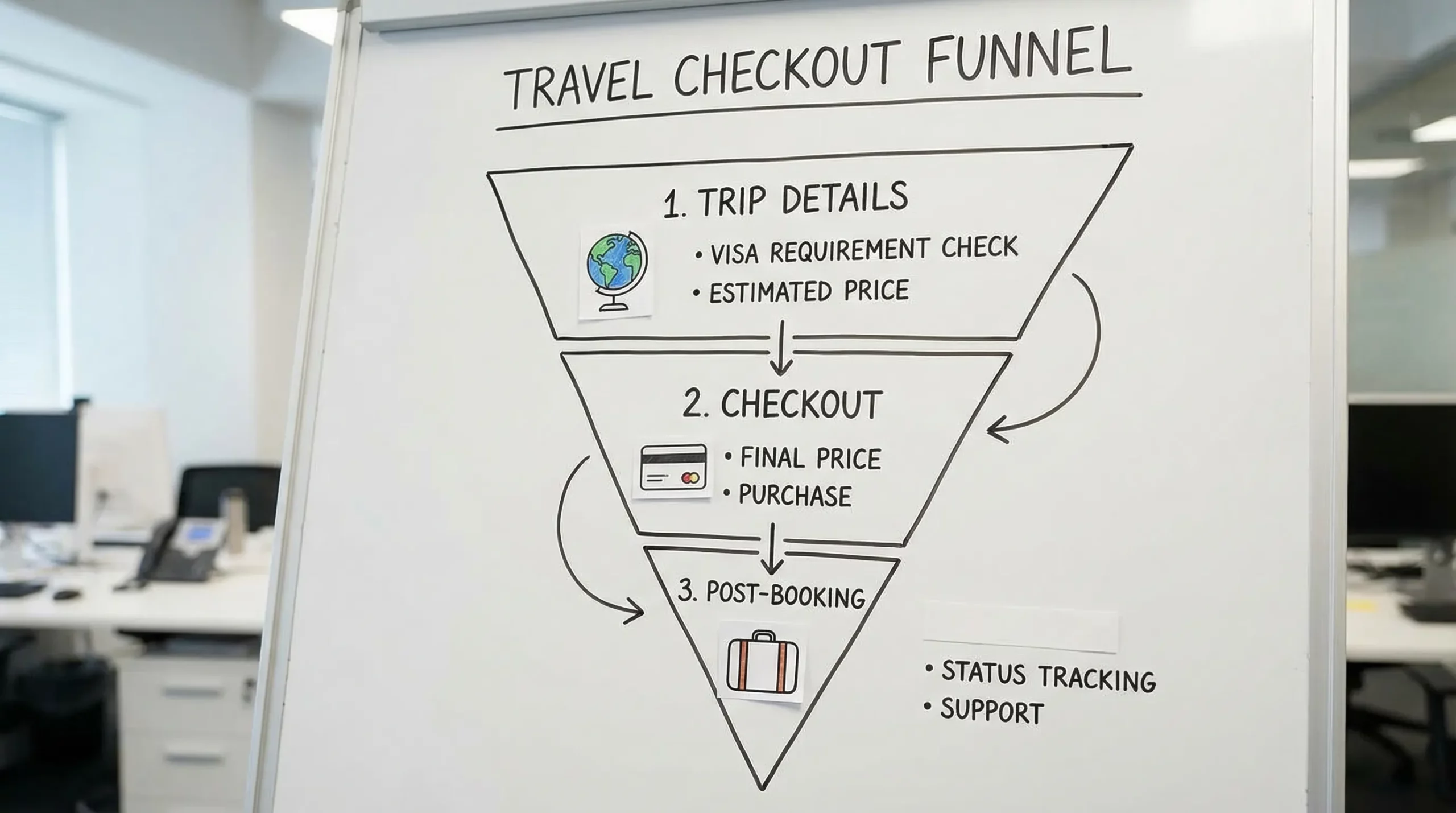
- Surface visa eligibility and an estimated total range early (search results, trip details, or cart)
- Confirm the exact price when the traveler selects the visa add-on
This reduces surprise without forcing everyone into a long detour before they have committed to the itinerary.
2) Make the service fee feel like a product, not a penalty
Travelers accept service fees when the value is clear. They resist them when the fee looks like a hidden tax.
Avoid labels like:
- “Processing fee” (sounds like pure margin)
- “Convenience fee” (often perceived negatively)
Prefer value-oriented language such as:
- “Application assistance”
- “Guided visa application”
- “eVisa management”
The naming should match what you actually provide. Do not promise outcomes you cannot guarantee.
3) Keep the total price “proportional” to the trip
A $25 service fee can feel reasonable on a $1,200 itinerary and unacceptable on a $120 one-way flight.
This is why many high-performing programs use either:
- A small fixed service fee (simple and transparent), or
- A tiered fee aligned to complexity or urgency, not to cart value
Percentage markups can work, but they also create price spikes on premium itineraries where the traveler is already paying more and is less tolerant of “extra margin.”
4) Separate “optional” from “required” with care
Visas are sometimes required, sometimes not, and sometimes depend on nationality, transit rules, or residency.
If your UI implies “you must buy this here,” you will trigger distrust.
A conversion-safe approach is:
- “You may need a visa. Check requirements.”
- “If required, you can apply now or later.”
Then compete on speed, clarity, and convenience.
5) Price for operational sustainability, not just attach rate
The cheapest visa add-on is often the most expensive in operations.
Underpricing tends to create:
- More low-intent purchases
- Higher refund and dispute rates
- More support load per application
That operational drag can indirectly reduce conversion elsewhere (slower support, worse post-booking experience, more negative reviews).
Choose a pricing model that matches your funnel and your risk
There is no universal “best” model. The right model depends on where you sell (checkout vs post-booking), your customer support maturity, and how much control you have over UX.
| Pricing model | What the traveler sees | Best for | Conversion risk to watch |
|---|---|---|---|
| Pass-through government fee + fixed service fee | “Gov fee + Service fee = Total” | Most checkout flows, especially price-sensitive markets | Fixed fee can feel high on low-cost trips |
| Pass-through government fee + percentage markup | One blended total or fee line | Brands that want margin to scale automatically | High totals on expensive trips can trigger abandonment |
| Tiered packages (Standard vs Priority/Managed) | Clear options with different fees | Mixed customer base with varying urgency | Too many choices increases decision friction |
| Post-booking price lock (same fee after booking) | “Apply now or later for the same price” | Brands worried about checkout friction | Lower checkout attach rate, but potentially higher overall completion |
| Bundle (visa + travel doc management or protection) | One combined add-on price | When you already sell add-ons successfully | Bundles must be clearly optional to avoid distrust |
A simple rule of thumb
- If you sell in checkout, prefer fixed fee or two-tier pricing.
- If you sell post-booking, you can test slightly higher fees because the traveler is less price-anchored to the base fare, but you must protect NPS.
Design your tiers around urgency and complexity, not “upsell vibes”
Tiers convert when they map to real traveler jobs.
Two high-signal tier dimensions:
Urgency (days to departure)
A traveler booking close to departure values speed and reduced error risk.
Pricing implication:
- Keep a baseline service fee for standard timelines.
- Offer a higher-priced “priority handling” option only when it is actually feasible and operationally supported.
Complexity (document and rule complexity)
Some destinations and traveler profiles require more documents, more checks, and more back-and-forth.
Pricing implication:
- Reserve higher tiers for cases that truly require more work.
- Keep the default tier simple so most travelers do not feel they are paying for edge cases.
Where pricing goes wrong: 7 patterns that quietly kill conversion
These issues show up repeatedly in booking-flow analytics for regulated add-ons.
1) Surprise totals at the end
If the first time a customer sees the visa add-on price is the last step, you are manufacturing abandonment.
2) Ambiguous fee breakdown
Travelers do not need a lecture, but they do need clarity.
At minimum, give them:
- Government fee
- Service fee
- Total
3) Currency mismatch
If the booking is in USD but the visa fee shows in another currency (or switches mid-flow), trust drops.
4) “From $X” pricing without guardrails
“From $29” works only if most users actually qualify for $29.
Otherwise it feels like bait-and-switch.
5) Poor mobile price readability
Visa flows are often completed on mobile, especially for last-minute travel. If the price is below the fold or hidden behind accordions, attach rate suffers.
For more UX fixes that typically lift completion, see: Why Travelers Abandon Visa Forms and 6 UX Fixes That Convert.
6) A refund policy that is unclear (or feels unfair)
Even when government fees are non-refundable, you can reduce disputes by being explicit before payment.
7) No explanation of what happens next
A traveler who pays still wonders:
- “What do I receive?”
- “When?”
- “Where do I track it?”
Uncertainty increases support contacts and buyer’s remorse, which then increases refund requests.
A practical way to set your price: “conversion-safe unit economics”
If you are pricing visa add-ons as an ancillary revenue stream, you need a price that survives real-world operations.
A useful internal model is:
Service fee floor = average cost to deliver + risk buffer + target margin
Where average cost to deliver includes:
- Vendor cost (revenue share, per-application fees, or both)
- Payment fees
- Support time (including escalations)
- Refund and dispute handling
- Compliance overhead (logging, audits, reporting)
Then you test upward until you hit your conversion guardrail.
Set a guardrail before you A/B test
Do not optimize for visa attach rate alone. Set an explicit policy, for example:
- “We will not accept more than X% drop in overall checkout completion.”
- “We will not accept an increase in chargebacks above Y%.”
(Your X and Y depend on your baseline funnel and support capacity.)
What to test (and what to measure)
Pricing optimization without measurement becomes opinion.
These are high-leverage experiments that typically do not require a full rebuild.
| Test idea | What you change | Primary metric | Secondary guardrails |
|---|---|---|---|
| Fee framing | “Service fee” label vs value-based label | Visa attach rate | Checkout completion, refunds |
| Fee structure | Fixed fee vs two-tier fee | Revenue per booking | Support contacts, disputes |
| Price timing | Show estimate early vs show only at checkout | Checkout completion | Visa attach rate |
| Transparency | Blended total vs itemized breakdown | Conversion to purchase | Trust signals (CSAT, complaints) |
| Default selection | Preselected add-on vs opt-in | Attach rate | Complaint rate, regulatory review |
When you implement, track KPIs at the program level, not just at the component level. This KPI guide is a good baseline: 5 KPIs to Track After Deploying a Visa Management Platform.
A note on ethics and compliance when pricing “required” travel documents
Dynamic pricing can increase revenue, but it can also create reputational risk in regulated journeys.
A safer approach is to vary price only when it reflects real cost drivers the traveler understands, such as:
- Priority handling
- Additional review and document validation
- Group or family applications (more applicants, more work)
Avoid tactics that look like “surge pricing because you are stuck.” In border compliance, trust is a conversion lever.
Implementation playbook (fast and realistic)
Align stakeholders early
Visa pricing touches multiple teams:
- Product (checkout and post-booking UX)
- Revenue management (margin targets)
- Support/ops (capacity and SLAs)
- Legal/compliance (disclosures, refunds)
A 30-minute alignment meeting can prevent weeks of rework.
Launch with one simple model, then iterate
For most travel brands, the simplest starting point is:
- Government fee pass-through
- One fixed service fee
- One optional priority tier (only if you can deliver it)
Then evolve based on data.
Protect trust with three “always-on” UX elements
- Clear breakdown (government fee, service fee, total)
- Clear deliverable (what the traveler receives, where it is stored)
- Clear policy (timelines, what happens on denial, what is refundable)
Frequently Asked Questions
Should we markup government visa fees or only charge a service fee? Most brands protect trust by passing through government fees and charging a separate service fee. If you do markup, keep transparency high so it does not look like a hidden tax.
Is a fixed fee or percentage fee better for conversion? Fixed fees are usually easier to understand in checkout and often convert better, especially for low to mid-priced trips. Percentage fees can overreach on premium itineraries and create sticker shock.
Should we sell visa add-ons in checkout or after booking? Checkout maximizes attach rate when pricing and UX are clean. Post-booking can protect checkout conversion, but you may lose travelers who forget or postpone. Many brands run a hybrid approach: awareness in checkout, conversion post-booking.
How do we price “priority” without causing complaints? Only sell priority if you can operationally support it, and define what priority means (faster review, faster submission, or faster status updates). Ambiguity increases refunds and disputes.
What KPIs matter most when adjusting visa add-on pricing? Track visa attach rate, overall checkout completion, ancillary revenue per booking, refund and dispute rate, and support contact rate. Optimize for portfolio health, not one metric.
Build a conversion-safe visa add-on with SimpleVisa
If you want to monetize visas without sacrificing checkout performance, pricing is only half the equation. You also need accurate eligibility, low-friction applications, and reliable tracking so customers trust the add-on.
SimpleVisa helps travel businesses integrate visa services via API, a white-label visa application app, or no-code implementation, and it is already used across 400+ sites. If you are evaluating pricing models, attach-rate strategy, or how to embed visa offers in your booking flow, explore SimpleVisa and align pricing with an implementation that can actually deliver on the promise.