Visa Eligibility API: Reduce Timatic Errors in Checkout

Checkout is where compliance and conversion collide. If your site shows the wrong entry requirements (or shows the right rules in the wrong way), travelers hesitate, agents get flooded with tickets, and airlines risk last-minute offloads and denied boarding. Many travel brands trace this back to “Timatic errors” in the booking path, not always because Timatic is wrong, but because the rules are easy to misapply when context is missing.
A Visa Eligibility API solves the core issue: it turns entry-rule logic into a deterministic, testable service that can run in real time, with the exact traveler and itinerary context your checkout needs.
What “Timatic errors” really look like in checkout
Timatic (maintained by IATA) is widely used in the industry as a reference for passenger documentation and entry requirements. You can see the official framing in IATA’s overview of Timatic. In practice, “Timatic errors” is often shorthand for any of these problems:
- False positives (unnecessary friction): your checkout says “visa required” when the traveler is visa-exempt, eligible for an eVisa, or only needs an eTA.
- False negatives (compliance risk): your checkout says “no visa needed” but the traveler actually requires a visa, transit permit, onward ticket, or additional documents.
- Unhelpful answers: “Check with the embassy” or generic warnings that do not tell the traveler what to do next.
- Itinerary blind spots: rules differ for transit, multiple stops, one-way tickets, or when the traveler is entering from a specific country.
The business impact is predictable:
- Lower conversion due to uncertainty at payment.
- Higher support load from “Do I need a visa?” contacts.
- Operational disruption close to departure.
- Lost ancillary revenue when a traveler who needs a visa is not guided into a purchase flow.
Why Timatic-driven implementations fail at checkout
Even if your compliance source is strong, implementation gaps cause most errors. Here are the recurring root causes travel teams run into.
1) Missing passenger context
Many rule engines require more than “passport nationality + destination.” Eligibility can change based on:
- Country of residence
- Passport type (ordinary, diplomatic, emergency)
- Visa history or prior travel restrictions (varies by destination)
- Age and traveling with minors
If checkout only captures partial information, you will get partial accuracy.
2) Itinerary complexity is under-modeled
A frequent failure mode is treating the trip as a single “origin to destination” leg. Real rules can depend on:
- Transit location(s) and layover duration
- Airside vs landside transit
- Return or onward ticket requirements
- Mixed carriers and airport changes
3) Rule interpretation and UX translation
Timatic-style content can be nuanced. If your UI compresses nuanced text into a single label, you introduce ambiguity. Examples:
- “Visa required” vs “Visa required unless…”
- “Eligible for eVisa” vs “Eligible to apply for eVisa before travel”
- “Proof of onward travel required” hidden behind a link
4) Caching and stale rule snapshots
Entry requirements change frequently (fees, eligible nationalities, new authorizations like ETAs, additional forms). If you cache too aggressively without versioning, you can surface outdated eligibility.
5) Lack of observability and testing
Most teams do not have a repeatable way to answer:
- Which rule triggered this result?
- Which input field changed the outcome?
- Did we regress after a code push?
Without auditability, errors are hard to prove and even harder to fix.
What a Visa Eligibility API should do (beyond “visa required / not required”)
A checkout-grade Visa Eligibility API should behave like a decision service: given normalized traveler and itinerary inputs, it returns a structured answer that your product and compliance teams can trust.
At minimum, aim for outputs that support:
- Requirement classification: visa-free, eTA/ETA, eVisa, consular visa, additional permits
- Actions: “apply online,” “apply at consulate,” “obtain authorization before boarding,” “collect documents”
- Traveler guidance: clear next steps, not just policy text
- Reason codes and rule traceability: so your team can debug and support can explain
- Change resilience: versioned rules or effective dates, so you can reproduce results later
A practical mental model is: the API should tell your checkout not only what is required, but also what to do next, and why.
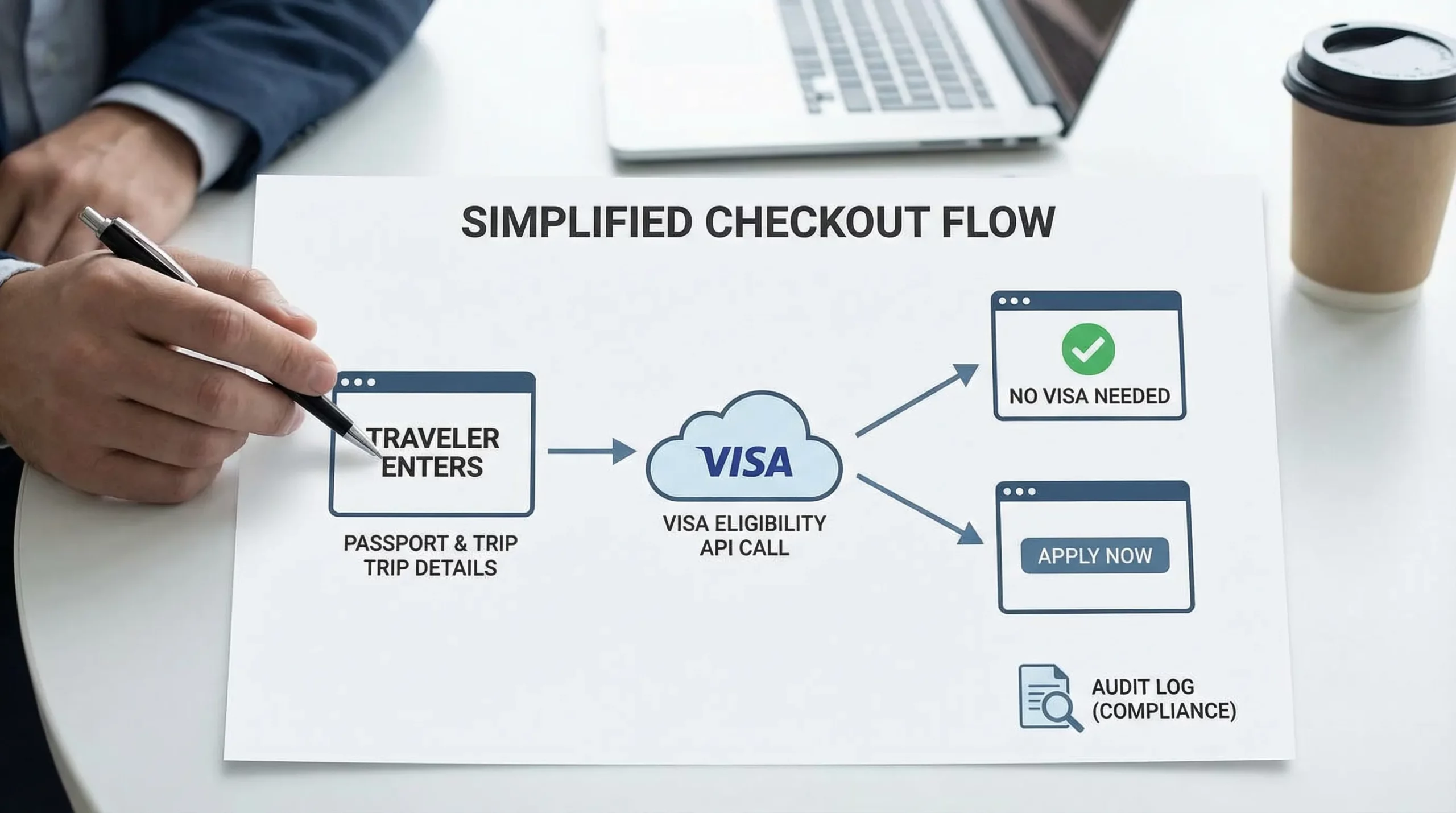
The minimum inputs you need to reduce eligibility mistakes
Teams often ask, “What data do we need to collect without hurting conversion?” The trick is progressive capture: gather the minimum early, then ask for more only when needed.
Here is a practical input map for eligibility checks.
| Input | Why it matters | Common error if missing |
|---|---|---|
| Passport nationality | Core eligibility driver | Wrong visa-free vs visa-required result |
| Destination country | Core eligibility driver | Wrong document type entirely |
| Travel dates | Rules can be time-bound | Showing outdated or future requirements |
| Transit country(ies) + layover | Transit rules differ | Missed transit visa requirements |
| Point of embarkation | Some rules depend on where you travel from | Incorrect exemptions or additional checks |
| Passport expiry date | Validity rules vary | Boarding issues due to passport validity |
| Purpose of travel | Tourist vs business vs study differs | Wrong category, wrong documents |
| Residence (optional but valuable) | Can change eligibility and process | Overstated requirements or missed shortcuts |
If you only take two fields (nationality + destination), you can still provide a rough answer, but you should label it accordingly and prompt for more details when the result is uncertain.
Integration pattern: how to use a Visa Eligibility API in checkout
The best-performing implementations treat eligibility as a product feature, not a compliance pop-up.
Step 1: Run an early “pre-check” (before payment)
Trigger an eligibility call once the user has:
- selected itinerary
- entered passenger nationality (or chosen passenger profile)
This reduces last-second surprises and prevents payment abandonment.
Step 2: Use progressive disclosure for additional questions
When the API indicates conditionality (for example, “visa-free if X, otherwise eVisa”), ask only the next needed question. This avoids form bloat.
Step 3: Translate results into decisive UI
Good checkout messaging has three parts:
- a clear statement (what is needed)
- a confidence framing (based on the data supplied)
- an action (what the traveler should do now)
Example patterns:
- “No visa required for stays up to X days. Bring proof of onward travel.”
- “eVisa required before travel. Apply now, typical processing time varies by destination.”
Avoid burying the action behind FAQs. If the user needs an eVisa, the best outcome is a guided application flow immediately.
Step 4: Log eligibility decisions for support and disputes
To reduce support tickets, store the eligibility response associated with:
- booking reference
- passenger profile version
- itinerary version
- rule version or timestamp
This creates a consistent record when travelers ask, “Why did your site tell me I didn’t need anything?”
For a deeper view of end-to-end automation (rules, workflows, submission, tracking), see What Is Travel Document Automation? Definitions, Benefits, and Myths.
How a Visa Eligibility API reduces Timatic errors (in practice)
A Visa Eligibility API reduces Timatic errors by addressing the exact failure modes that happen in checkout.
It forces normalized, validated inputs
Most “wrong rule” outcomes are actually “wrong input” outcomes. An eligibility API can enforce normalization such as:
- consistent country codes
- standardized travel dates
n- known passport types
If you also add passport data capture from the MRZ (machine readable zone) upstream, you reduce typos and mismatches.
It handles itinerary-aware logic
Eligibility is often itinerary-dependent. A purpose-built service can evaluate:
- transit rules
- stopover thresholds
- multi-country journeys
This is especially important for OTAs, cruise lines, and multi-leg flight bookings.
It improves explainability
Instead of a block of policy text, APIs can return structured reason codes. That supports:
- better UX copy
- faster customer support
- compliance review
It enables controlled updates and regression tests
With a versioned API, you can build a test suite of representative itineraries (your top 50 routes and nationalities, plus edge cases) and verify results before releases.
If you are already embedding visa application flows, a good reference on the mechanics is How eVisa APIs work: Step by Step.
A practical QA checklist for eligibility accuracy
Eligibility accuracy is not only about the rules source, it is about product discipline. Here is a checklist teams can run each release cycle.
| QA area | What to test | What it prevents |
|---|---|---|
| Input validation | Empty fields, invalid dates, unknown codes | Silent misclassification |
| Transit logic | Same-airport transit, airport change, long layovers | Missed transit permits |
| Conditional rules | “Visa-free if…” branches | False “visa required” flags |
| Copy translation | Same result rendered across web/mobile | Confusing or inconsistent guidance |
| Caching strategy | Rule refresh, TTL, fallbacks | Stale requirements displayed |
| Logging | Booking-level eligibility snapshot | Support disputes and escalations |
Build vs buy: what to look for in a Visa Eligibility API vendor
Many teams start by directly consuming compliance text and mapping it in-house. This can work, but it becomes expensive when you need high coverage, frequent changes, and robust edge case handling.
When evaluating providers, focus on what reduces your operational risk.
Coverage and rule freshness
Ask how the provider handles:
- new policies and sudden changes
- effective dates
- known exception handling (nationality, residence, transit)
A helpful companion resource for your internal stakeholders is Visa Requirements by Country: A Quick Reference.
Actionability: can you monetize the result?
Eligibility is most valuable when it can turn into a guided application and a measurable attach rate. If your goal is ancillary revenue, you want:
- a clear “apply now” path
- a way to track eligibility checks to completed applications
SimpleVisa’s platform is designed for travel businesses to guide customers through border requirements and increase ancillary revenue, with options like API integration, a white-label visa application app, and data services. If you are exploring broader commercial models, 7 Revenue-Sharing Models for Online Visa Processing Partners is a useful framework.
Security and authentication
Eligibility calls may look “low risk,” but in real systems they tie to bookings and passenger data. Demand strong authentication, key rotation practices, and webhook verification if applicable. For implementation guidance, see Developer Q&A: Best Practices for Authenticating Against the SimpleVisa API.
Operational fallback
No system is perfect. What matters is what happens when:
- the traveler’s case is ambiguous
- the provider cannot determine a result confidently
- the trip includes special statuses (emergency documents, refugee travel documents, etc.)
A good API and UX will surface “needs review” paths early, not at the gate.
Where SimpleVisa fits
If your goal is to reduce Timatic errors in checkout while also turning eligibility into a revenue-generating workflow, SimpleVisa provides multiple deployment options:
- API integration for embedding into booking flows
- White-label visa application app for fast time-to-market
- Custom data services when you need tailored outputs
- No-code implementation options to launch without heavy engineering
SimpleVisa is used on 400+ sites and focuses on guided customer visa applications and premium eVisa management. You can explore the platform at SimpleVisa and align your implementation with your preferred integration model.
Frequently Asked Questions
Is Timatic inaccurate, or is the problem usually integration? Timatic is a widely trusted industry reference, but checkout “errors” often come from missing traveler context, simplified itinerary modeling, stale caching, or unclear UI translation.
What is a Visa Eligibility API, in plain terms? A Visa Eligibility API is a service that takes traveler and itinerary inputs (nationality, destination, dates, transit) and returns a structured determination of required entry documents and next steps.
How early should we run visa eligibility checks in the booking flow? Ideally before payment, once the itinerary and basic passenger nationality are known. Then use progressive questions only when the result depends on additional factors.
Can we reduce support tickets with eligibility checks alone? Yes, if results are actionable and explainable. Logging eligibility decisions per booking and showing clear next steps reduces repetitive “Do I need a visa?” contacts.
Do we need an API if we already show a static visa requirements page? Static pages help for research, but checkout decisions are personalized and itinerary-based. APIs are better suited for real-time, passenger-specific determinations.
How does eligibility checking connect to ancillary revenue? When eligibility is clear and immediate, you can present the right product (eVisa, ETA, or application support) at the moment the traveler is most motivated, during booking or right after.
Reduce Timatic errors in checkout with a Visa Eligibility API
If you want fewer compliance-related drop-offs, fewer avoidable support contacts, and a clearer path from “Do I need a visa?” to “Done,” it is time to treat eligibility as a real-time service.
SimpleVisa helps travel businesses embed eligibility checks and guided application flows through API, white-label, and no-code options. Visit SimpleVisa to explore the right integration approach, or request a demo to see how eligibility can work directly inside your checkout.