eVisa Upsell Copy That Converts Without Raising Refunds

Refunds are the silent killer of eVisa ancillary revenue.
An eVisa upsell can look fantastic in an A/B test (higher attach rate, higher revenue per booking), then quietly lose money through refund requests, chargebacks, and support load because the copy overpromised, underexplained, or pressured the wrong travelers.
This guide is about writing eVisa upsell copy that converts and stays converted. You will get practical guardrails, a plug-and-play message blueprint, and copy templates you can adapt for checkout, post-booking, and pre-departure.
Why eVisa upsells get refunded (and why copy is usually the root cause)
Most refunds are not “price objections.” They are expectation gaps.
When travelers buy an electronic visa inside a booking flow, they often assume at least one of these is true:
- “This guarantees entry.”
- “This is the government fee, so it must be refundable.”
- “I can do it later, it will still be fast.”
- “I’m eligible because I’m traveling there.”
- “This is the same thing as an ETA/ESTA/ETIAS.”
Your UX can be solid and still suffer refunds if the copy does not close those gaps.
Here is a practical map of the most common refund drivers, and the copy element that prevents each one.
| Refund driver (what happened) | What the traveler thought | Copy element that prevents it |
|---|---|---|
| Ineligible traveler purchased | “Everyone needs the same document.” | Eligibility clarity (who needs it, who does not) and a “check eligibility” cue |
| Timeline mismatch | “Approval is instant” or “I can do this the day before.” | Processing-time expectations and a “recommended apply-by” line |
| Service-scope confusion | “This includes embassy appointment / complex case handling.” | What’s included vs not included (plain language) |
| Refund-policy misunderstanding | “If I cancel my trip, I get it back.” | Clear refund terms, especially government fees and submitted applications |
| Document readiness issues | “I can upload whatever photo later.” | Document requirements preview (photo, passport scan), and quality standards |
| Duplicate purchase | “I bought it twice because I wasn’t sure it went through.” | Confirmation microcopy, receipts, status visibility |
| “Guarantee” assumption | “If it’s denied, you refund everything.” | Denial expectations (approval is a government decision), plus what happens next |
If your team already tracks KPIs after launching a visa flow, you can tie these drivers directly to metrics like refund-request rate and contact rate (SimpleVisa has a useful KPI framework in its guide to tracking post-deployment performance).
The 6 principles of conversion-safe eVisa upsell copy
These principles are designed for travel brands selling eVisas during checkout or post-booking, where trust and speed matter, and where “misleading urgency” backfires.
1) Lead with the job to be done, not the product
Travelers are not buying an “eVisa.” They are buying:
- confidence they can board
- confidence they will not be turned away at the border
- a simpler visa application
High-converting copy starts with the outcome (smooth border crossing), then names the product (eVisa/ETA) second.
2) Be specific about who this is for
The fastest way to increase refunds is to sell to people who do not need the document.
Your copy should include one explicit filter line:
- “For travelers with a {passport_country} passport visiting {destination} for {purpose}.”
If you cannot confidently personalize, be honest and present it as a check:
- “Not sure if you need an eVisa? Check in 30 seconds.”
3) Promise process, not outcomes
You can promise:
- guided application
- automated checks
- secure submission
- status tracking
You should avoid promising:
- guaranteed approval
- guaranteed entry
- “instant approval” unless it is truly instant for that destination and segment
If your provider has a strong approval rate, you can reference it carefully as a historical performance claim, not a guarantee. For example, SimpleVisa explains how it achieves its approval performance in its approval-rate breakdown.
4) Use “calm urgency” instead of fear
Fear-based upsells (“You might be denied boarding!!!”) spike conversion today and refunds tomorrow.
Calm urgency works because it is true:
- visas take time
- documents must match
- governments can request additional info
Your tone should reduce panic and increase clarity.
A helpful rule: if your copy makes a traveler anxious, they will contact support. If it makes them feel prepared, they will complete the application.
In rare cases, travelers experience significant travel-related anxiety beyond normal stress. It can help to have a general internal resource list for customer-care teams, including local support options (for example, NYC-based travelers seeking help can look into comprehensive psychiatric services in NYC for anxiety and related concerns). This is not upsell copy, but it is part of an end-to-end care mindset.
5) Make refund terms readable at the decision point
Refund-policy text hidden behind a link is not “transparent” in practice.
At the point of purchase, include one plain-language sentence that answers:
- “Can I refund this if I change my mind?”
- “What if I’m denied?”
This is not legal drafting. It is expectation setting.
6) Match the traveler’s mental model: eVisa vs ETA vs authorization
Many travelers treat eVisas, eTAs, and authorizations as interchangeable.
If your flow sells multiple document types, your copy should name what it is in common terms:
- “eVisa (electronic visa)”
- “ETA (electronic travel authorization)”
And confirm the job:
- “Required to board your flight to {destination}.”
A message blueprint you can reuse across checkout and post-booking
Instead of rewriting from scratch per destination, use a modular structure. It keeps copy consistent, easier to localize, and safer for refunds.
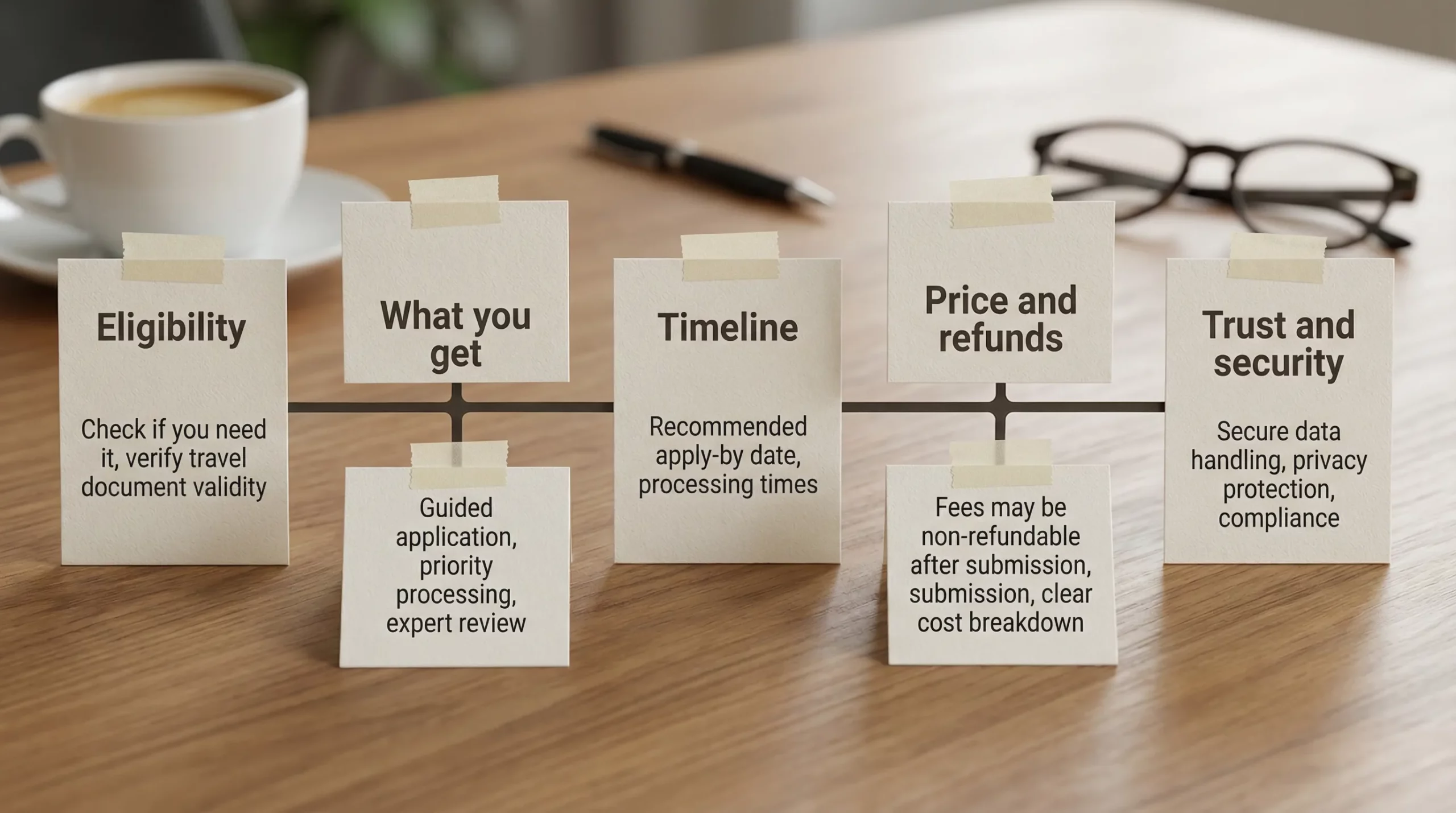
Use these five blocks in this order:
| Block | Purpose | What to say (template) |
|---|---|---|
| Eligibility | Prevent wrong purchases | “Based on your passport and trip, you may need an {document_type} to enter {destination}.” |
| Value | Make it feel worth it | “Complete your visa application with guided steps, document checks, and status updates.” |
| Timeline | Prevent last-minute refunds | “Typical processing: {range}. Recommended: apply by {date}.” |
| Price + refunds | Reduce disputes | “Includes service support. Government decisions are outside our control. Fees may be non-refundable after submission.” |
| Trust | Reduce drop-off | “Secure online visa processing. Your data is protected and used only for your application.” |
You do not need all five blocks in every placement. For example:
- Checkout modal: all five
- Post-booking email: eligibility, timeline, CTA
- Pre-departure reminder: timeline, status, next step
Copy templates you can paste into your flow
Below are adaptable templates. Replace variables in {brackets}.
Template 1: Checkout card (compact)
Add your {document_type} for {destination}

Check eligibility in 30 seconds, then complete a guided visa application without leaving our site.
Typical processing: {range}. Recommended apply-by: {date}.
Why it works: it sells the outcome (eligibility, guided completion) and anchors time.
Template 2: Checkout modal (high intent)
Do you need an eVisa for {destination}?

Most travelers with a {passport_country} passport need a {document_type} before departure.

What you get
- Guided visa application and document checks
- Secure submission and status updates

Timing
Typical processing: {range}. Apply by {date} to reduce risk.

Refunds
After submission, some fees may be non-refundable (including government fees).

[Check eligibility]  [Continue without adding]
Notes:
- The “Continue without adding” link reduces pressure and can lower refunds.
- If you do not want bullets, convert the “What you get” section into two short lines.
Template 3: Post-booking email (education without overwhelming)
Subject: One thing to confirm before your trip to {destination}

Hi {first_name},

Depending on your passport, you may need a {document_type} (electronic visa) before you travel to {destination}.

It usually takes {range} to process, so we recommend applying by {date}.

Start your application here: {link}

Tip: Use your passport’s MRZ (the two lines at the bottom) to avoid name mismatches.
Why it works: it is calm, specific, and includes one concrete error-prevention tip.
Template 4: Pre-departure reminder (low attention)
Reminder: your {destination} entry document

If you have not applied for your {document_type} yet, now is the safest time.
Typical processing: {range}. Start here: {link}
This template is designed to reduce “I bought it yesterday, refund me” scenarios.
Template 5: Denial expectation (use sparingly, but clearly)
Put this in an expandable section or a short “Learn more” panel:
Approval is issued by the destination’s government. While we guide your application and help reduce errors, approval is not guaranteed.
If an application is denied, we will share the decision and next steps available for that destination.
This reduces chargeback risk by making the decision boundary explicit.
Template 6: Support macro for refund requests (protect margin while staying fair)
Thanks for reaching out. I can help.

If your application has not been submitted yet, we can stop it so you are not charged for submission-related fees.
If it has already been submitted, some fees may be non-refundable (including government fees), because the application has entered processing.

If you share your booking email and application status, I will confirm what options apply in your case.
This macro reduces escalation because it explains the “why” in plain language.
Microcopy that lowers refunds without lowering conversion
Most teams focus on headlines and CTAs. Refund reduction often comes from small clarifications at high-friction steps.
Here are three high-impact microcopy placements.
At the price line
Instead of:
- “$59.00”
Use:
- “$59.00 (service + government fees, where applicable)”
If government fees vary by nationality or urgency, say that. Price ambiguity drives disputes.
At the document upload step
Add a single line above uploads:
- “Uploads must be clear and unedited. Blurry images are the #1 cause of delays.”
Delays are a common trigger for refund requests, even when the traveler provided the wrong file.
At the confirmation state
After purchase/submission, prevent duplicates:
- “You are all set. Your application is in progress. We will email you when the status changes.”
When travelers do not see a stable “in progress” state, they buy again or contact support.
How to test upsell copy without accidentally increasing refund rate
If your experiments only track attach rate, you will eventually ship a “winner” that loses money.
Use a scorecard that pairs revenue with refund and support signals.
| Metric | Why it matters | How to interpret copy impact |
|---|---|---|
| Attach rate (upsell conversion) | Measures purchase intent | Should rise with clearer value and eligibility |
| Refund-request rate | Measures expectation mismatch | Should fall when refund terms and scope are explicit |
| Chargeback rate | Measures trust and disputes | Often falls with transparent policies and confirmation states |
| Visa-related contact rate | Measures confusion | Falls when timeline, docs, and “what is this” are clear |
| Time-to-complete application | Measures friction | Falls when copy previews requirements and reduces surprises |
A simple experiment discipline:
- Keep the offer and pricing constant.
- Change only one copy block (eligibility framing, timeline line, refund sentence, trust line).
- Evaluate on both attach rate and downstream costs over a full booking cycle.
If you are seeing abandonment inside the form itself, pair this article with SimpleVisa’s breakdown of why travelers quit and how to fix it in its form-abandonment UX guide.
Where SimpleVisa fits (without overpromising)
Travel brands typically need two things to make eVisa upsell copy work in reality:
- Accurate eligibility and requirements so the copy is truthful for the traveler seeing it.
- A smooth, guided application so the promise in the copy matches the experience.
SimpleVisa is designed for travel businesses that want to embed visa processing automation into the booking journey via API integration, a white-label visa application app, or custom data services, with options that can be implemented without heavy engineering.
If you are building your upsell program end to end, the most useful next step is to align copy to the exact touchpoints you control (checkout, manage booking, email/SMS, app push) and then map it to the underlying integration model. SimpleVisa outlines these patterns in its guide to marketing eVisa services during the booking flow.
The core idea to carry forward: conversion and refund reduction are not opposites when your copy is specific, calm, and honest about eligibility, timeline, and refund reality.